
Hello Team,
Greetings!!

Use Case:
The client wants to pass 3 digit extension number instead of 10 digit DID number on the C2C API.

Solution:
1.) In Leadsquared under user profile in the other details section we have a user field called ‘Telephony Agent Id’ where they can pass a 3 digit extension number (for this specific use case and the number of digits may vary depending on different use cases), PFB just for reference

2.) Then mail merge this value on the click 2 call client-side script on the mail merge params,
Client-side Script
For telephony providers with JavaScript SDKs, the Click2Call functionality can be configured using a client-side script. The outbound phone call functionality will be handled by the script and the call will be initiated via the browser to the telephony provider.
- Enter the URL of the Javascript file, which must be hosted on the LeadSquared domain (external domains are not supported). The JS file will be published only after an internal review process.
- You can pass data to the script using mail-merge parameters (like agent phone number, lead phone number, etc.).
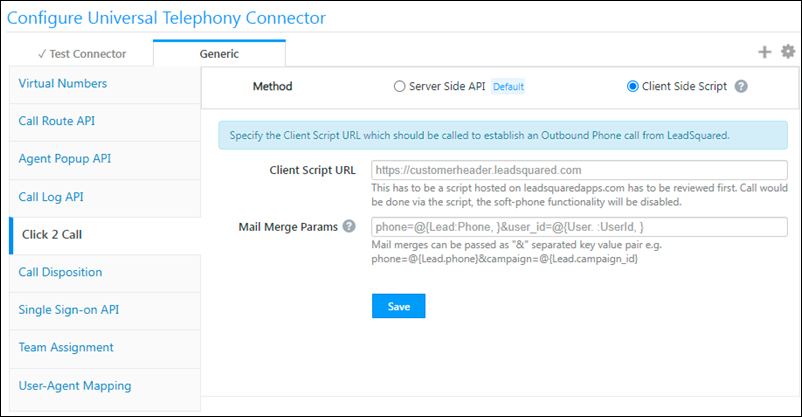
An example of the mail merge value can be [Extension_number=@{User : Telephony Agent ID}]
Once this is done the telephony provider will do the rest of the mapping where the 3 Digit extension number will be mapped with user specific DID numbers and the call will be placed.
Attaching the help article for more reference
For any help you may contact Saurabh Khotani or Sampat Narasinha Adya


