
Issue:
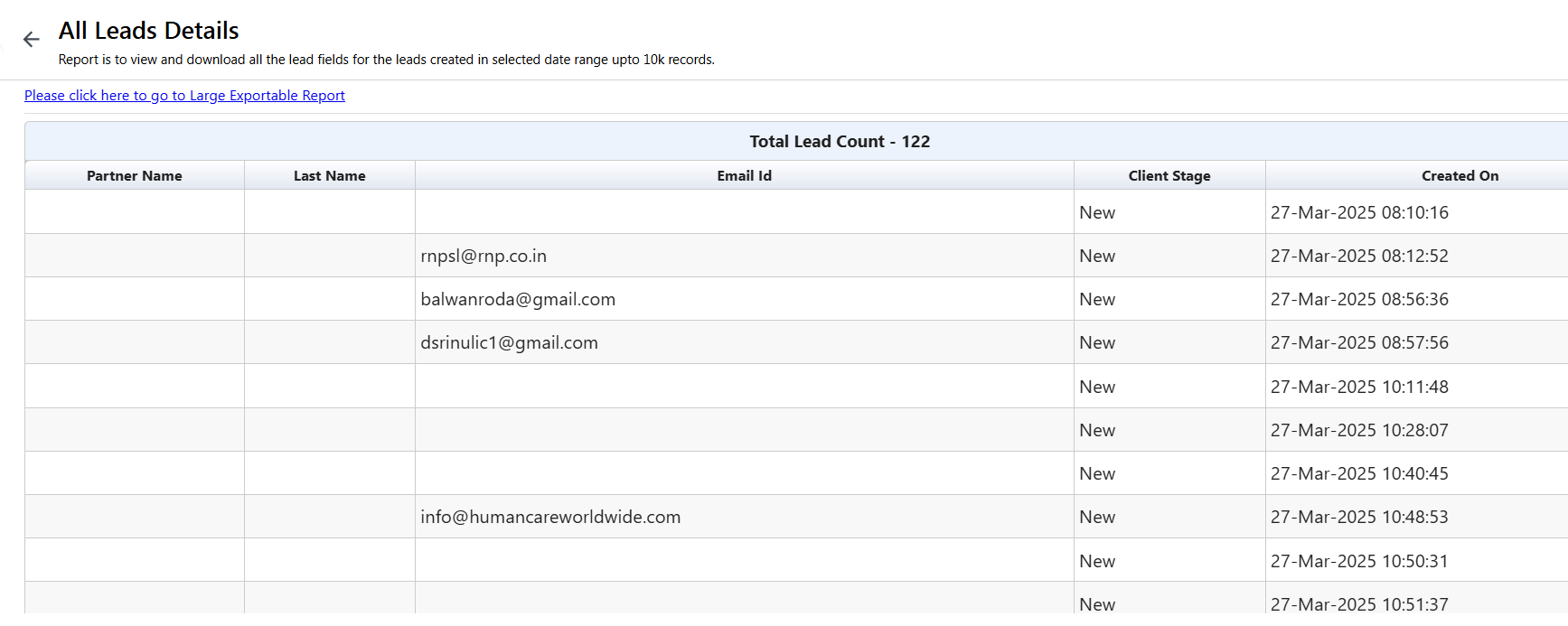
Unable to view value for a lead field while filtering a report. No value is displayed for the lead field on all leads although the value exists for the lead field.
Example reference in case of a lead field “Partner Name”:
RCA:
The lead field is observed to contain a space before the start of the display name, that is, the name is displayed as ” Partner Name”. Our API is unable to fetch reports when a word begins with a space character. However, spaces between words do not impact the search criteria.

Unable to view value for a lead field while filtering a report. No value is displayed for the lead field on all leads although the value exists for the lead field.
Example reference in case of a lead field “Partner Name”:
RCA:
The lead field is observed to contain a space before the start of the display name, that is, the name is displayed as ” Partner Name”. Our API is unable to fetch reports when a word begins with a space character. However, spaces between words do not impact the search criteria.
After removing the space at the beginning of the word and conducting further tests, we confirmed that the issue was resolved, and the report is now successfully retrieved.
Note:
This issue, where data cannot be retrieved for display names containing a leading space, is addressed/handled within SEIRA reports, and the corrected value is reflected accordingly.


