
Hi Team,
Greetings!
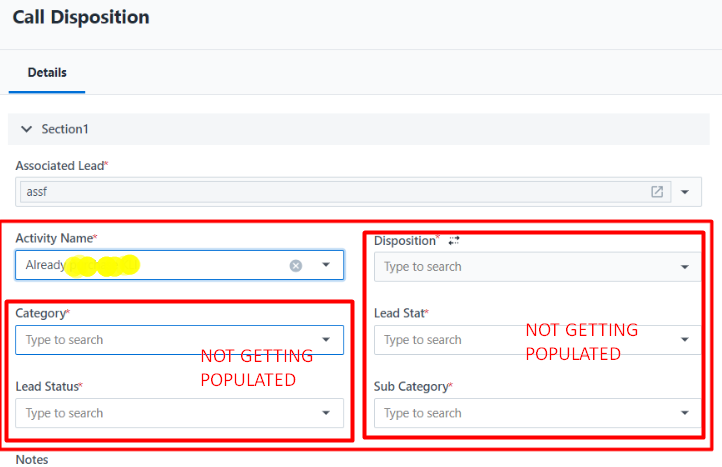
Issue – In new UI – Users were facing issue with Manage Forms rule trigger. Suppose – A Rule is set on the activity name and then other fields will get auto-populate, but that is not happening when Account is transferred into New UI.
These are values where Read-Only is marked and Set Value is placed for the rules.
Sample Screenshot from the Incident :
Greetings!
Issue – In new UI – Users were facing issue with Manage Forms rule trigger. Suppose – A Rule is set on the activity name and then other fields will get auto-populate, but that is not happening when Account is transferred into New UI.
These are values where Read-Only is marked and Set Value is placed for the rules.
Sample Screenshot from the Incident :
Activity Name is selected, after which other fields should get auto-populated by Rules designated, which isn’t happening when new UI is active.
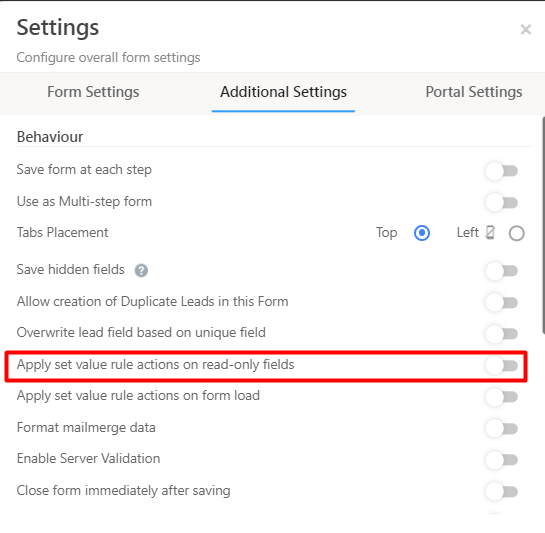
Solution Selecting this Configuration from the Form Settings can help in eliminating this issue.
Solution – In Manage Forms – Additional Settings
Thanks
Happy Learning!
Solution Selecting this Configuration from the Form Settings can help in eliminating this issue.
Solution – In Manage Forms – Additional Settings
Thanks
Happy Learning!


