
This article will cover all the workflows rules configured for our support systems:
Lead Assignment Rules — >
This is the place where we configured all our TAM accounts. Enabling and disabling TAM rules are done here.
Lead Assignment Rules — >
This is the place where we configured all our TAM accounts. Enabling and disabling TAM rules are done here.
https://desk.zoho.in/support/leadsquaredmarketxpander/ShowHomePage.do?articlestatus=published&rootcategoryId=24894000000059504&categoryId=24894000110222781&status=published#setup/automation/directassignment
Round Robin –>
This is the default round robin option given by Zoho. However, it was not working for our scenario(where large number of agents are available). Hence, we have used it for creating small round robins for Kotak, Exide life etc,(which contains just 2 agents).
https://desk.zoho.in/support/leadsquaredmarketxpander/ShowHomePage.do?articlestatus=published&rootcategoryId=24894000000059504&categoryId=24894000110222781&status=published#setup/automation/24894000000010772/autoassignment
Notify — >
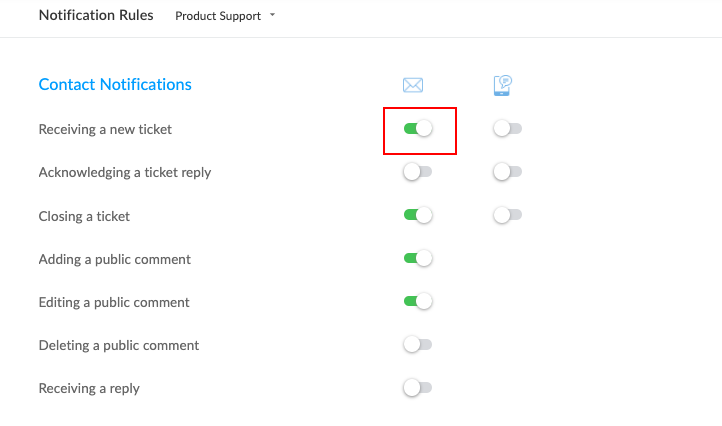
All the notifications (notfying the agent, customer, department etc) is enabled and controlled from here. When a looping of ticket happens and lot of duplicate leads are created, to break the loop we get to this option and disable the notify customer card, so it breaks the loop.
https://desk.zoho.in/support/leadsquaredmarketxpander/ShowHomePage.do?articlestatus=published&rootcategoryId=24894000000059504&categoryId=24894000110222781&status=published#setup/automation/24894000000010772/notifyrules
Round Robin –>
This is the default round robin option given by Zoho. However, it was not working for our scenario(where large number of agents are available). Hence, we have used it for creating small round robins for Kotak, Exide life etc,(which contains just 2 agents).
https://desk.zoho.in/support/leadsquaredmarketxpander/ShowHomePage.do?articlestatus=published&rootcategoryId=24894000000059504&categoryId=24894000110222781&status=published#setup/automation/24894000000010772/autoassignment
Notify — >
All the notifications (notfying the agent, customer, department etc) is enabled and controlled from here. When a looping of ticket happens and lot of duplicate leads are created, to break the loop we get to this option and disable the notify customer card, so it breaks the loop.
https://desk.zoho.in/support/leadsquaredmarketxpander/ShowHomePage.do?articlestatus=published&rootcategoryId=24894000000059504&categoryId=24894000110222781&status=published#setup/automation/24894000000010772/notifyrules
Workflow Rules — >
All the custom functions are set up here, where in the starting from Tags, premium support, Round robin action, description copy, splitting the closed tickets. All these actions are configured here. I have also provided the description for each rule, for everyone to understand the used case of each rules.
https://desk.zoho.in/support/leadsquaredmarketxpander/ShowHomePage.do?articlestatus=published&rootcategoryId=24894000000059504&categoryId=24894000110222781&status=published#setup/automation/24894000000010772/workflows/rules
When the custom functions rules are not working as expected, you can check from the link given below, if any errors has occurred.
https://desk.zoho.in/support/leadsquaredmarketxpander/ShowHomePage.do?articlestatus=published&rootcategoryId=24894000000059504&categoryId=24894000110222781&status=published#setup/automation/24894000000010772/workflows/customfunctions
Blueprint — >
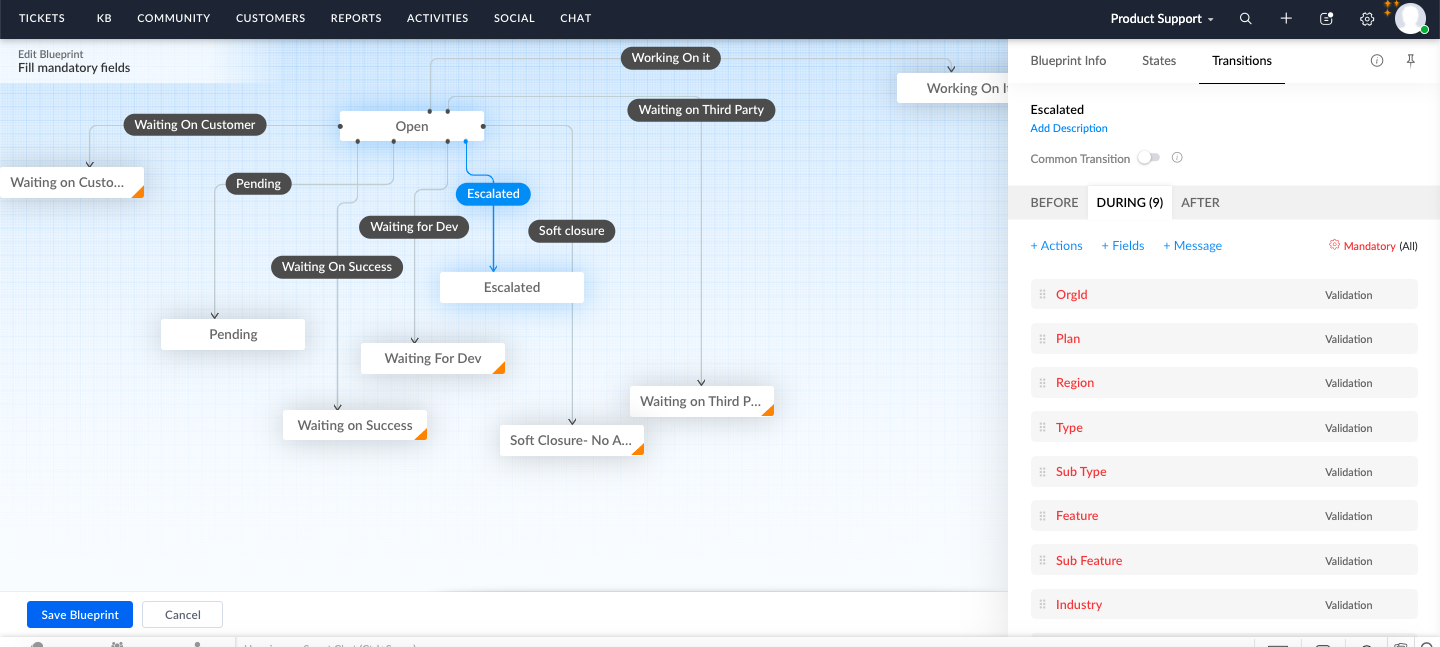
We have a limitation in Desk where in even though the fields are set as mandatory, still you could save the status without entering the value. To overcome this error/ miss, we brought in Blueprint function which will ensure the agent is entering the mandatory fields before changing the status initially.
https://desk.zoho.in/support/leadsquaredmarketxpander/ShowHomePage.do?articlestatus=published&rootcategoryId=24894000000059504&categoryId=24894000110222781&status=published#setup/automation/24894000000010772/blueprint
All the custom functions are set up here, where in the starting from Tags, premium support, Round robin action, description copy, splitting the closed tickets. All these actions are configured here. I have also provided the description for each rule, for everyone to understand the used case of each rules.
https://desk.zoho.in/support/leadsquaredmarketxpander/ShowHomePage.do?articlestatus=published&rootcategoryId=24894000000059504&categoryId=24894000110222781&status=published#setup/automation/24894000000010772/workflows/rules
When the custom functions rules are not working as expected, you can check from the link given below, if any errors has occurred.
https://desk.zoho.in/support/leadsquaredmarketxpander/ShowHomePage.do?articlestatus=published&rootcategoryId=24894000000059504&categoryId=24894000110222781&status=published#setup/automation/24894000000010772/workflows/customfunctions
Blueprint — >
We have a limitation in Desk where in even though the fields are set as mandatory, still you could save the status without entering the value. To overcome this error/ miss, we brought in Blueprint function which will ensure the agent is entering the mandatory fields before changing the status initially.
https://desk.zoho.in/support/leadsquaredmarketxpander/ShowHomePage.do?articlestatus=published&rootcategoryId=24894000000059504&categoryId=24894000110222781&status=published#setup/automation/24894000000010772/blueprint
Escalate SLA– >
Our organizational SLA is configured here. The SLA is a replica of the one which is available in our leadsquared helpcenter website. We have set the SLA, based on Business hour + Prioirty +Ticket ownership.
https://desk.zoho.in/support/leadsquaredmarketxpander/ShowHomePage.do?articlestatus=published&rootcategoryId=24894000000059504&categoryId=24894000110222781&status=published#setup/automation/24894000000010772/blueprint
Supervise– >
https://desk.zoho.in/support/leadsquaredmarketxpander/ShowHomePage.do?articlestatus=published&rootcategoryId=24894000000059504&categoryId=24894000110222781&status=published#setup/automation/24894000000010772/supervise/rules
We have 2 status for closure, one is Resolved and another is Closed. Resolved status is an On-hold status within Zoho Desk. This is because, we do not want the customer happiness rating to be initiated for a resolved ticket immediately. We keep a buffer of 48 hours for Resolved tickets and only then we Close the ticket so that the customer happiness is sent to the customer.
This is achieved from this rule. We have set a condition wherein, after 48 calendar hours if the status is still Resolved without any change then change the status to Closed.
Schedules — >
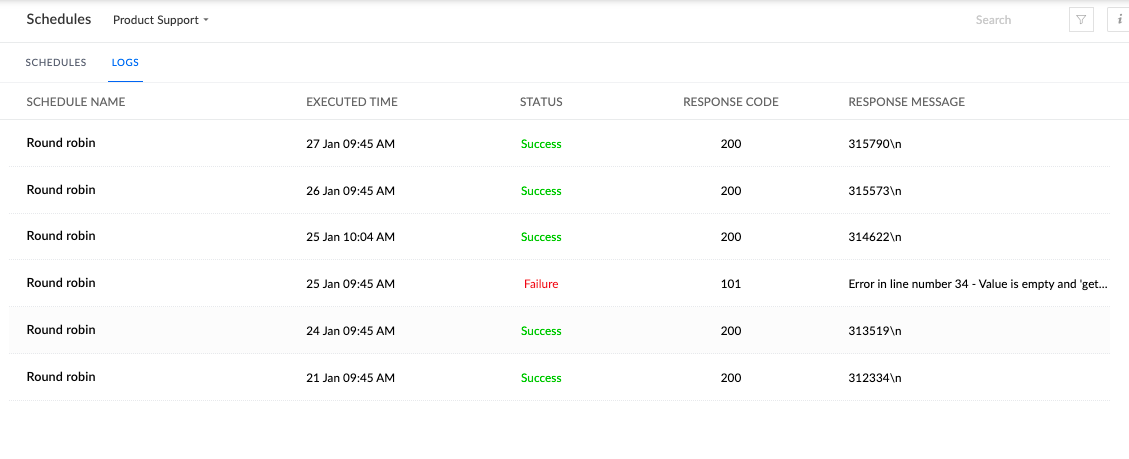
We have tickets coming into Desk during non business hours. These tickets will land in Unassigned bin. These tickets are repushed to round robin every working day at 9:45 AM. This is set via this rule.
https://desk.zoho.in/support/leadsquaredmarketxpander/ShowHomePage.do?articlestatus=published&rootcategoryId=24894000000059504&categoryId=24894000110222781&status=published#setup/automation/24894000000010772/schedules
In case any issues with unassigned not getting cleared, we can check if there is any failures.
Our organizational SLA is configured here. The SLA is a replica of the one which is available in our leadsquared helpcenter website. We have set the SLA, based on Business hour + Prioirty +Ticket ownership.
https://desk.zoho.in/support/leadsquaredmarketxpander/ShowHomePage.do?articlestatus=published&rootcategoryId=24894000000059504&categoryId=24894000110222781&status=published#setup/automation/24894000000010772/blueprint
Supervise– >
https://desk.zoho.in/support/leadsquaredmarketxpander/ShowHomePage.do?articlestatus=published&rootcategoryId=24894000000059504&categoryId=24894000110222781&status=published#setup/automation/24894000000010772/supervise/rules
We have 2 status for closure, one is Resolved and another is Closed. Resolved status is an On-hold status within Zoho Desk. This is because, we do not want the customer happiness rating to be initiated for a resolved ticket immediately. We keep a buffer of 48 hours for Resolved tickets and only then we Close the ticket so that the customer happiness is sent to the customer.
This is achieved from this rule. We have set a condition wherein, after 48 calendar hours if the status is still Resolved without any change then change the status to Closed.
Schedules — >
We have tickets coming into Desk during non business hours. These tickets will land in Unassigned bin. These tickets are repushed to round robin every working day at 9:45 AM. This is set via this rule.
https://desk.zoho.in/support/leadsquaredmarketxpander/ShowHomePage.do?articlestatus=published&rootcategoryId=24894000000059504&categoryId=24894000110222781&status=published#setup/automation/24894000000010772/schedules
In case any issues with unassigned not getting cleared, we can check if there is any failures.
USERS AND CONTROLS
Agents — >
https://desk.zoho.in/support/leadsquaredmarketxpander/ShowHomePage.do?articlestatus=published&rootcategoryId=24894000000059504&categoryId=24894000110222781&status=published#setup/users-control/agents
We add users and delete users from the above link. We can also give access to a new department from the above link.
Teams — >
This feature is majorly used by Developer department as they have views created based on teams. When adding a new user to developer department, please ensure to add them to the respective team too.
https://desk.zoho.in/support/leadsquaredmarketxpander/ShowHomePage.do?articlestatus=published&rootcategoryId=24894000000059504&categoryId=24894000110222781&status=published#setup/users-control/24894000000010772/teams
Agents — >
https://desk.zoho.in/support/leadsquaredmarketxpander/ShowHomePage.do?articlestatus=published&rootcategoryId=24894000000059504&categoryId=24894000110222781&status=published#setup/users-control/agents
We add users and delete users from the above link. We can also give access to a new department from the above link.
Teams — >
This feature is majorly used by Developer department as they have views created based on teams. When adding a new user to developer department, please ensure to add them to the respective team too.
https://desk.zoho.in/support/leadsquaredmarketxpander/ShowHomePage.do?articlestatus=published&rootcategoryId=24894000000059504&categoryId=24894000110222781&status=published#setup/users-control/24894000000010772/teams
Roles and Permissions — >
Restricting/ Giving the access to an agent or a role is carried out here.
https://desk.zoho.in/support/leadsquaredmarketxpander/ShowHomePage.do?articlestatus=published&rootcategoryId=24894000000059504&categoryId=24894000110222781&status=published#setup/users-control/roles
Import & Export –>
https://desk.zoho.in/support/leadsquaredmarketxpander/ShowHomePage.do?articlestatus=published&rootcategoryId=24894000000059504&categoryId=24894000110222781&status=published#setup/data-administration/import
You can import and export the data based on views from here. This is basically used when we migrate to a new application. Else, we can use reports instead.
Bulk Actions — >
Any Bulk actions carried out, the status will be visible here. For eg: Close all the tickets from a view. This is more like our Request history in Leadsquared.
https://desk.zoho.in/support/leadsquaredmarketxpander/ShowHomePage.do?articlestatus=published&rootcategoryId=24894000000059504&categoryId=24894000110222781&status=published#setup/data-administration/bulkactionslog
Recycle bin — >
In case we accidentally delete a ticket/ contact. you can restore the data from here.
https://desk.zoho.in/support/leadsquaredmarketxpander/ShowHomePage.do?articlestatus=published&rootcategoryId=24894000000059504&categoryId=24894000110222781&status=published#setup/data-administration/All/recyclebin
Recycle bin will hold 60 days data and then deletes after that automatically.
Zoho Desk API
Our Leadsquared 133 account is integrated to Desk with the help of API.
https://desk.zoho.in/support/leadsquaredmarketxpander/ShowHomePage.do?articlestatus=published&rootcategoryId=24894000000059504&categoryId=24894000110222781&status=published#setup/developer-space/api
We share the ORG ID and secret key details fro this page.
Would suggest Mubeen to generate this token often as it will capture the name of the agent who generates it.
Connections — > Any custom function to get executed will need the connections within its code. This Connection is created here.
https://desk.zoho.in/support/leadsquaredmarketxpander/ShowHomePage.do?articlestatus=published&rootcategoryId=24894000000059504&categoryId=24894000110222781&status=published#setup/developer-space/connections
Would suggest Mubeen to generate this token often as it will capture the name of the agent who generates it.
Restricting/ Giving the access to an agent or a role is carried out here.
https://desk.zoho.in/support/leadsquaredmarketxpander/ShowHomePage.do?articlestatus=published&rootcategoryId=24894000000059504&categoryId=24894000110222781&status=published#setup/users-control/roles
Import & Export –>
https://desk.zoho.in/support/leadsquaredmarketxpander/ShowHomePage.do?articlestatus=published&rootcategoryId=24894000000059504&categoryId=24894000110222781&status=published#setup/data-administration/import
You can import and export the data based on views from here. This is basically used when we migrate to a new application. Else, we can use reports instead.
Bulk Actions — >
Any Bulk actions carried out, the status will be visible here. For eg: Close all the tickets from a view. This is more like our Request history in Leadsquared.
https://desk.zoho.in/support/leadsquaredmarketxpander/ShowHomePage.do?articlestatus=published&rootcategoryId=24894000000059504&categoryId=24894000110222781&status=published#setup/data-administration/bulkactionslog
Recycle bin — >
In case we accidentally delete a ticket/ contact. you can restore the data from here.
https://desk.zoho.in/support/leadsquaredmarketxpander/ShowHomePage.do?articlestatus=published&rootcategoryId=24894000000059504&categoryId=24894000110222781&status=published#setup/data-administration/All/recyclebin
Recycle bin will hold 60 days data and then deletes after that automatically.
Zoho Desk API
Our Leadsquared 133 account is integrated to Desk with the help of API.
https://desk.zoho.in/support/leadsquaredmarketxpander/ShowHomePage.do?articlestatus=published&rootcategoryId=24894000000059504&categoryId=24894000110222781&status=published#setup/developer-space/api
We share the ORG ID and secret key details fro this page.
Would suggest Mubeen to generate this token often as it will capture the name of the agent who generates it.
Connections — > Any custom function to get executed will need the connections within its code. This Connection is created here.
https://desk.zoho.in/support/leadsquaredmarketxpander/ShowHomePage.do?articlestatus=published&rootcategoryId=24894000000059504&categoryId=24894000110222781&status=published#setup/developer-space/connections
Would suggest Mubeen to generate this token often as it will capture the name of the agent who generates it.


